![Alternative Revolver [PC/QUEST]](https://jinxxy-c.jinxxy-cdn.com/cdn-cgi/image/format=auto,onerror=redirect/987b48ca-7170-5883-acde-41f216fc7e4e/3875616749206373682/965009899516761088.png)
![Alternative Revolver [PC/QUEST]](https://jinxxy-c.jinxxy-cdn.com/cdn-cgi/image/format=auto,onerror=redirect/987b48ca-7170-5883-acde-41f216fc7e4e/3875616749206373682/965010022196312064.png)
![Alternative Revolver [PC/QUEST]](https://jinxxy-c.jinxxy-cdn.com/cdn-cgi/image/format=auto,onerror=redirect/987b48ca-7170-5883-acde-41f216fc7e4e/3875616749206373682/965009914739687424.png)
![Alternative Revolver [PC/QUEST]](https://jinxxy-c.jinxxy-cdn.com/cdn-cgi/image/format=auto,onerror=redirect/987b48ca-7170-5883-acde-41f216fc7e4e/3875616749206373682/965009927197664256.png)
![Alternative Revolver [PC/QUEST]](https://jinxxy-c.jinxxy-cdn.com/cdn-cgi/image/format=auto,onerror=redirect/987b48ca-7170-5883-acde-41f216fc7e4e/3875616749206373682/965009910523212800.png)
![Alternative Revolver [PC/QUEST]](https://jinxxy-c.jinxxy-cdn.com/cdn-cgi/image/format=auto,onerror=redirect/987b48ca-7170-5883-acde-41f216fc7e4e/3875616749206373682/965009922590595072.png)
商品描述
NOW AVAILABLE FOR QUEST
VRChat adaptation of the "Alternative Revolver", featuring its 3 original variants plus 1 new custom variant. Customize your revolver with custom colors, toss coins with the Marksman, charge powerful shots with the Piercer, bounce shots with the Sharpshooter, or go wild with the base variant.
The model and textures were all made by hand.
【Weapon Functionality】
- Custom colors via radial menu.

- Ability to holster the weapon on your waist (or any position you prefer, configurable in Unity)

- 4 different variants:

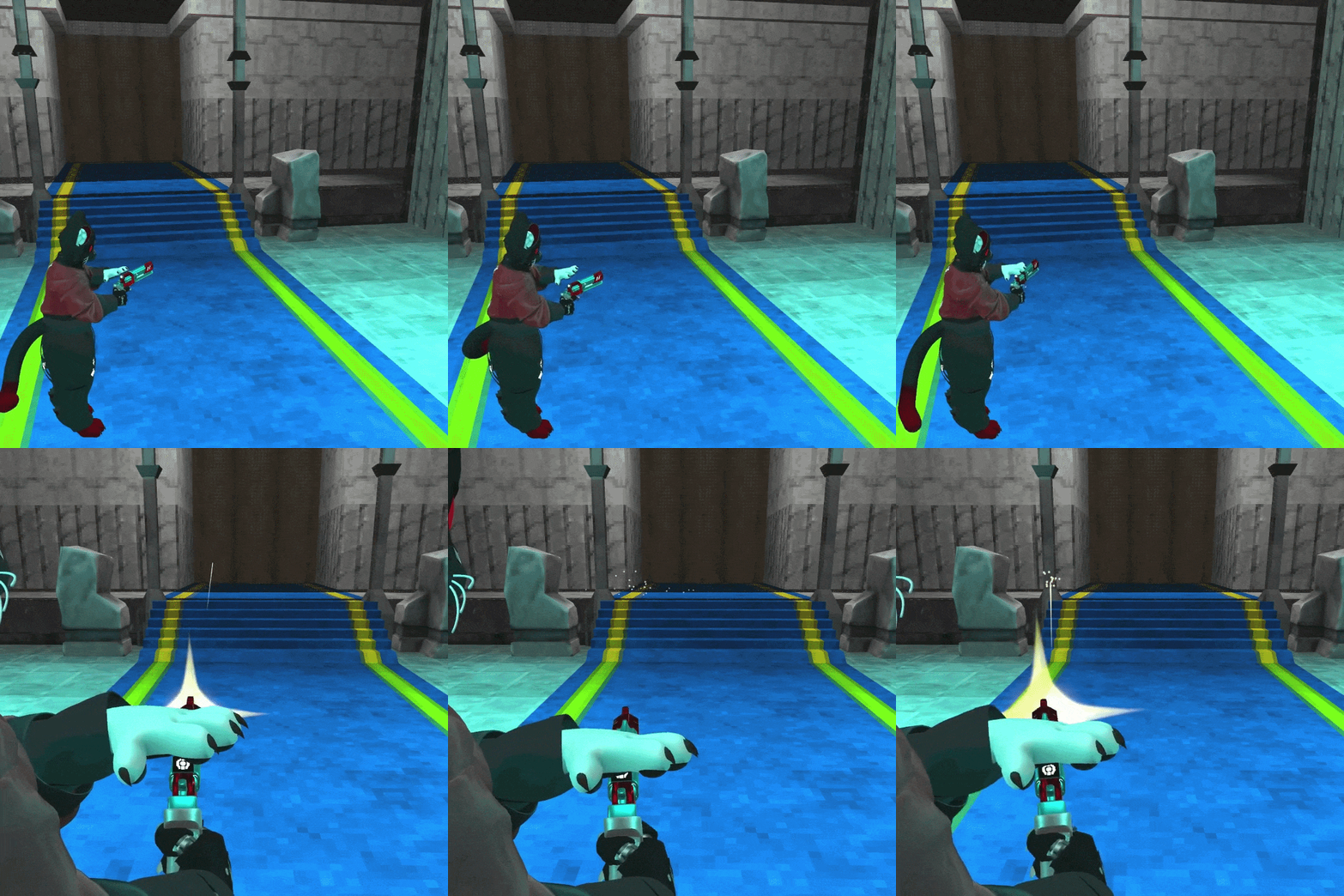
Marksman: Toss a coin and shoot it to ricochet your shots

Piercer: Charge the weapon to release a powerful shot

Sharpshooter: Spin the weapon to charge a ricochet shot

Base: When no mode is selected, you can release the safety to fire without reloading
【Controls】
All variants:
- Fist (Right Hand): Fire
- Thumbs up (Right Hand): Reload
- Open right hand near waist: Holster weapon
Marksman:
- Thumbs up (Left Hand): Toss a coin
- Shoot while the coin is in the air to hit it
Piercer:
- Peace sign (Right Hand): Charge shot
- Fist (Right Hand) after charging: Fire charged shot
Sharpshooter:
- Open right hand: Spin the weapon to charge a ricochet shot
- Fist (Right Hand) after charging: Fire ricochet shot
"Base" Variant:
- Placing your left open hand over the revolver screen will release the safety, allowing you to fire without reloading
【Features】
- Customizable colors
- Animations, particles, and sounds faithful to the original game
- Visual feedback for weapon cooldowns via the screen
- Ability to holster the weapon on your waist
- Easy installation with VRCFury
---------------------------------------------------------------------
【QUEST VERSION】
Due to Quest platform limitations, the following features are not included:
- No sound effects.
- Due to Contact system limitations, the default mode does not support rapid fire, and drawing the weapon from the waist may not function correctly. The weapon can still be drawn through the radial menu.
- The ability to adjust Metalness through Custom Colors has been removed.

All other features are fully functional, and much of the original logic has been adapted to preserve as much fidelity as possible to the PC version.
---------------------------------------------------------------------
Changelog
V1.10
- Enhanced metalness effect with MatCaps
- Restored missing particles for the Marksman variant
- Refined coin shot sound effects
- Added a hidden easter egg on the revolver display
- The revolver cylinder emission now blinks when fully charged in the Sharpshooter and Piercer variants.
- Reworked weapon coloring in “Custom Color” mode for better accuracy to the original game
---------------------------------------------------------------------
【Requirements】
- Poiyomi Shaders ( https://github.com/poiyomi/PoiyomiToonShader )
- VRCFury ( https://vrcfury.com/download/ )
【Stats】
Tris model: 16k
Materials: 19 (13 Model + 6 particles)
【Don't include】
+ Charm (You can get it from here: https://jinxxy.com/K_TechArmory/AVcharms )
【Installation】
- Import the .unitypackage file into your project
- Open the DarkoDaCat/Alternative Revolver ULTRAKILL folder
- Drag and drop the .prefab onto your avatar
- Adjust the revolver’s size
- Select the R_Hand Constraint GameObject and move the weapon to the right hand
- Select the L_Hand Constraint GameObject and move the sphere to the left hand
- Select the Hip_Constraint GameObject and position the revolver where you want it to be holstered
- Once everything is set up, the avatar is ready to upload
【Terms of Use】
- Don't resell.
- Don’t distribute.