
商品描述
本商品包含 AI 生成的内容。
The shaders, scripts and tools were developed with the help of AI and designed, directed, tuned and tested by ItzSlush. No AI-generated images are included.
Laser Screen VRC
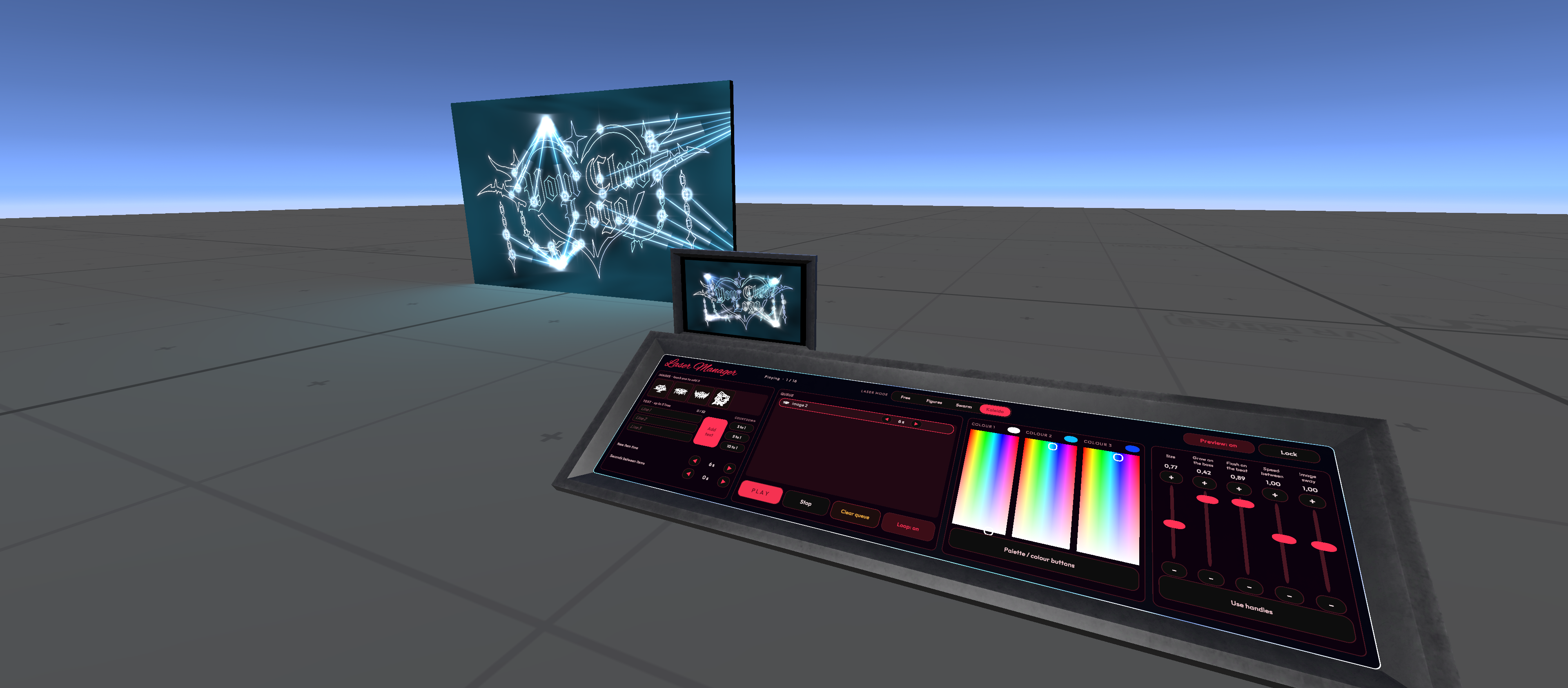
Your logo, drawn in lasers. A glass laser wall for VRChat worlds that draws your logos and texts with real beams, reacts to your music, and comes with a DJ panel to run the show live from inside the world.
PC & Quest · AudioLink · DJ Panel · LTCGI ready
What it does
- Draws your logos – bake up to 8 images in one click. The lasers trace their outline and aim their beams at it.
- Writes live text – up to 3 lines typed from the panel in the world, plus countdowns (3, 5 or 10 to 1).
- Moves to the music – beams, flashes and images follow AudioLink. No AudioLink? It runs on a built-in groove.
- 4 modes between images – Free, Figures, Swarm and Kaleido.
- Lights the room – optional LTCGI support, with live colours or a fixed colour that pulses on the bass.
The DJ Panel
Everything is synced for every player, late joiners included.
- Queue of images, texts and countdowns (up to 16 items) with Play, Stop, Loop and Clear
- 3 colour pickers and palette buttons
- Sliders for size, bass grow, beat flash, speed and sway
- Live preview screen of the wall (PC)
- Optional keypad lock with your own code
- Presets: a saved queue and look you start with one Udon event – great for events and recordings
Made to Be Easy
- Setup window that checks your whole scene and fixes problems with one button each
- Laser Figure Baker with live preview, auto-center and a smart selection tool
- Two ready prefabs: one with AudioLink + ProTV already connected, one without them for scenes that have their own
- Demo scene included
- Everything in one menu: Tools > Itz Slush > Laser Screen
- Full PDF guide
PC & Quest
A full PC version and a lighter Quest / Android version with the same images, colours and timing. Switch with one click.
Requirements
- Unity 2022.3 + VRChat Worlds SDK (Creator Companion)
- AudioLink
- ProTV (for the full prefab)
- LTCGI (optional)
Support
Questions, bugs and updates on Discord https://discord.gg/ByE4fX3ZB.
Terms
- Use it in as many of your own worlds as you want.
- Don't share, resell or re-upload the files, alone or as part of another package.