
HairFit: Fit Any Hair onto Any Head, No Original Avatar Needed
商品描述
本商品包含 AI 生成的内容。
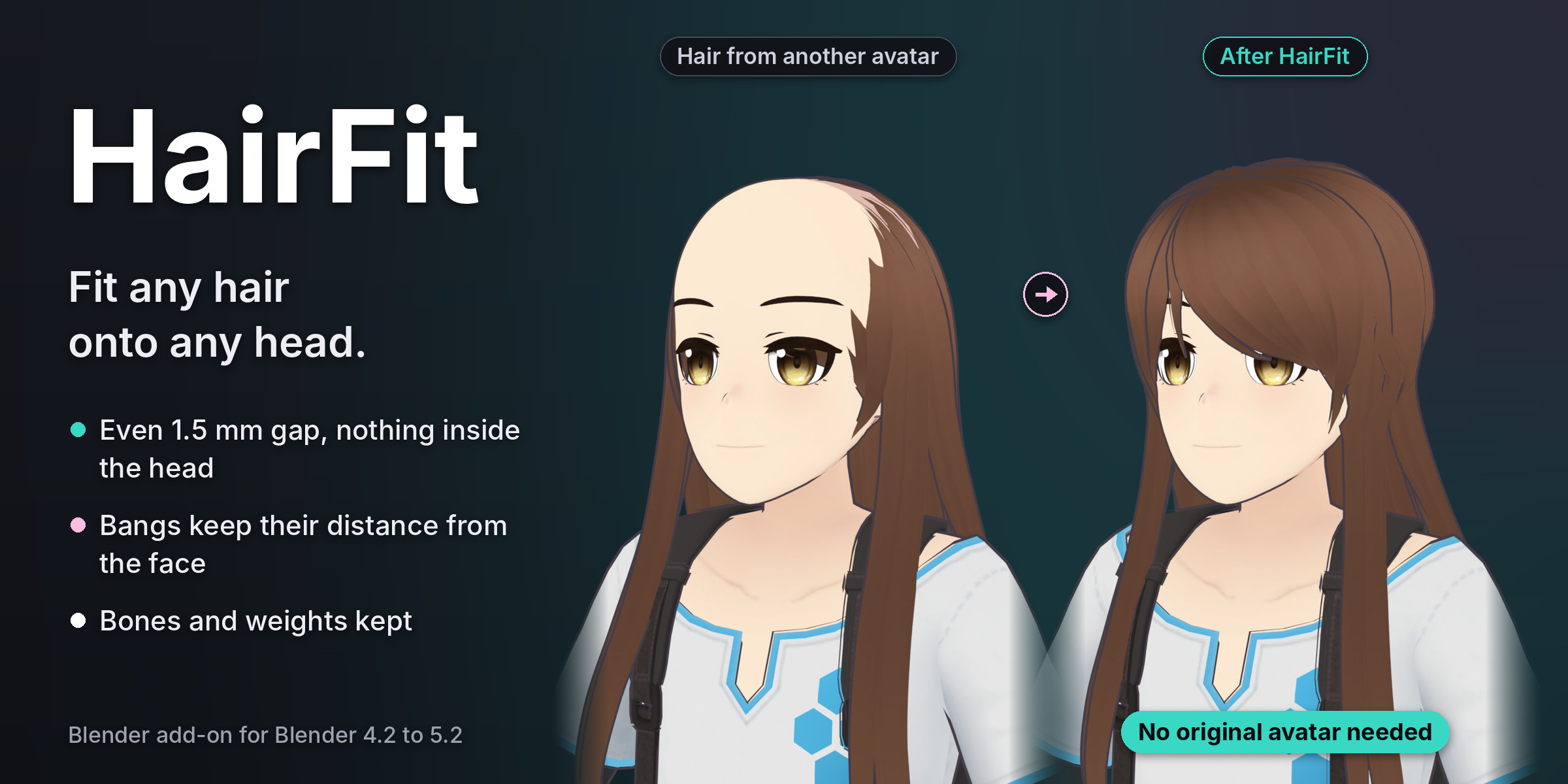
You found the right hair, but it was made for another avatar. On yours, the scalp pokes through the top, or the hair floats over a smaller head. Lining up the head bones does not fix it. Shrinkwrap flattens the style and glues the bangs to the face.
HairFit fits the hair to the head it is on now. It matches the size and position of the hair to the new skull. Then a smooth fit settles the inner side of the hair 1.5 mm off the scalp. The outer layers follow, so the style keeps its thickness. Bangs keep their distance from the face. Every weight stays, and the hair's own bones move with the hair.
You do not need the avatar the hair was made for. A hair with its own armature is lined up by its head bone first. If the original avatar is in the scene with the hair still on it, HairFit finds it and keeps every designed distance.
How it works
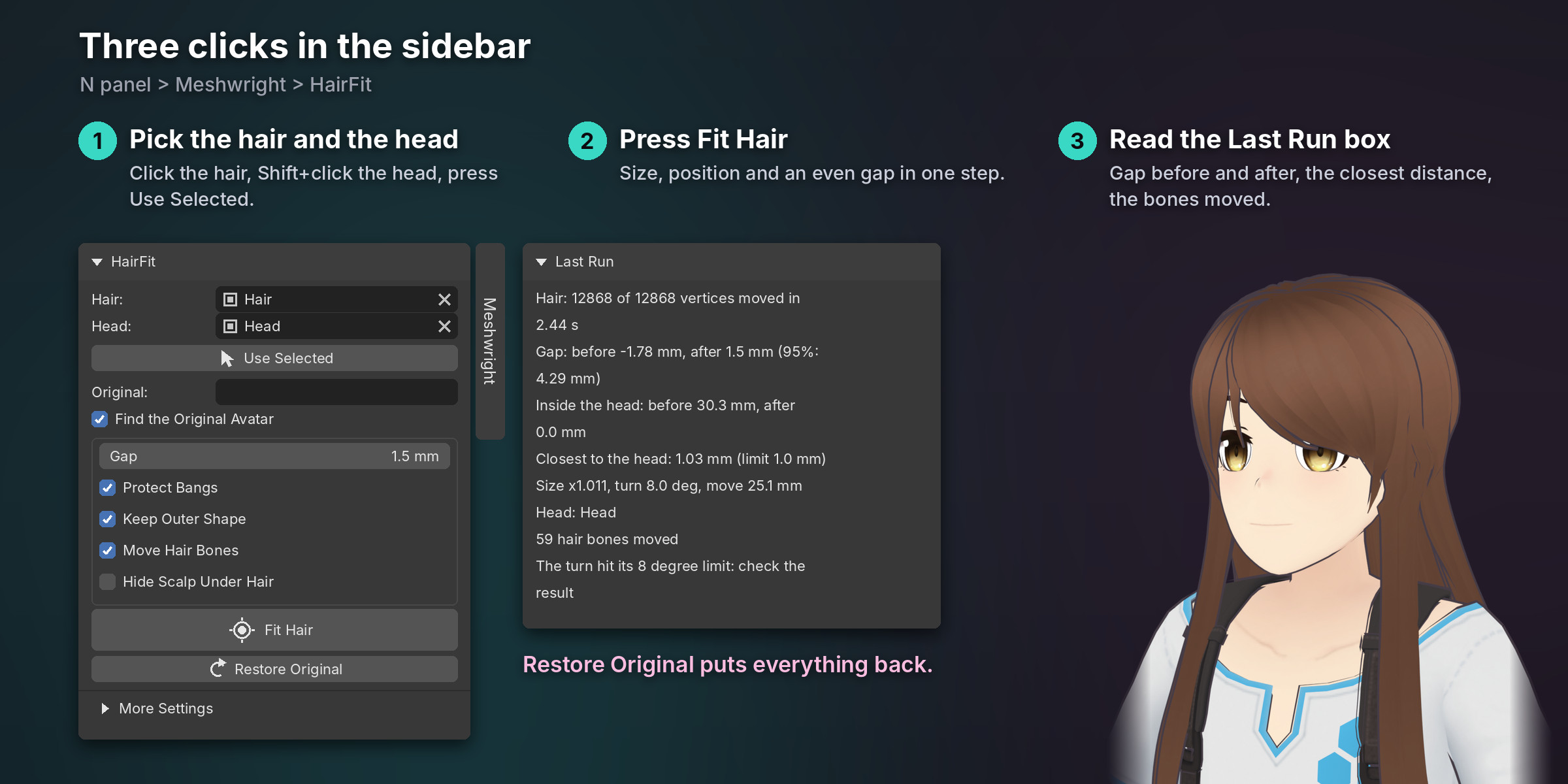
- Click the hair, then Shift+click your avatar's head. Press Use Selected.
- Press Fit Hair.
- Read the Last Run box: the gap before and after, how deep the hair was inside the head, and the closest distance.
A last check pushes out anything still closer than 1 mm. No hair vertex ends up inside the head. Change the Gap and press Fit Hair again: HairFit starts over from the original hair, so the same settings always give the same result.
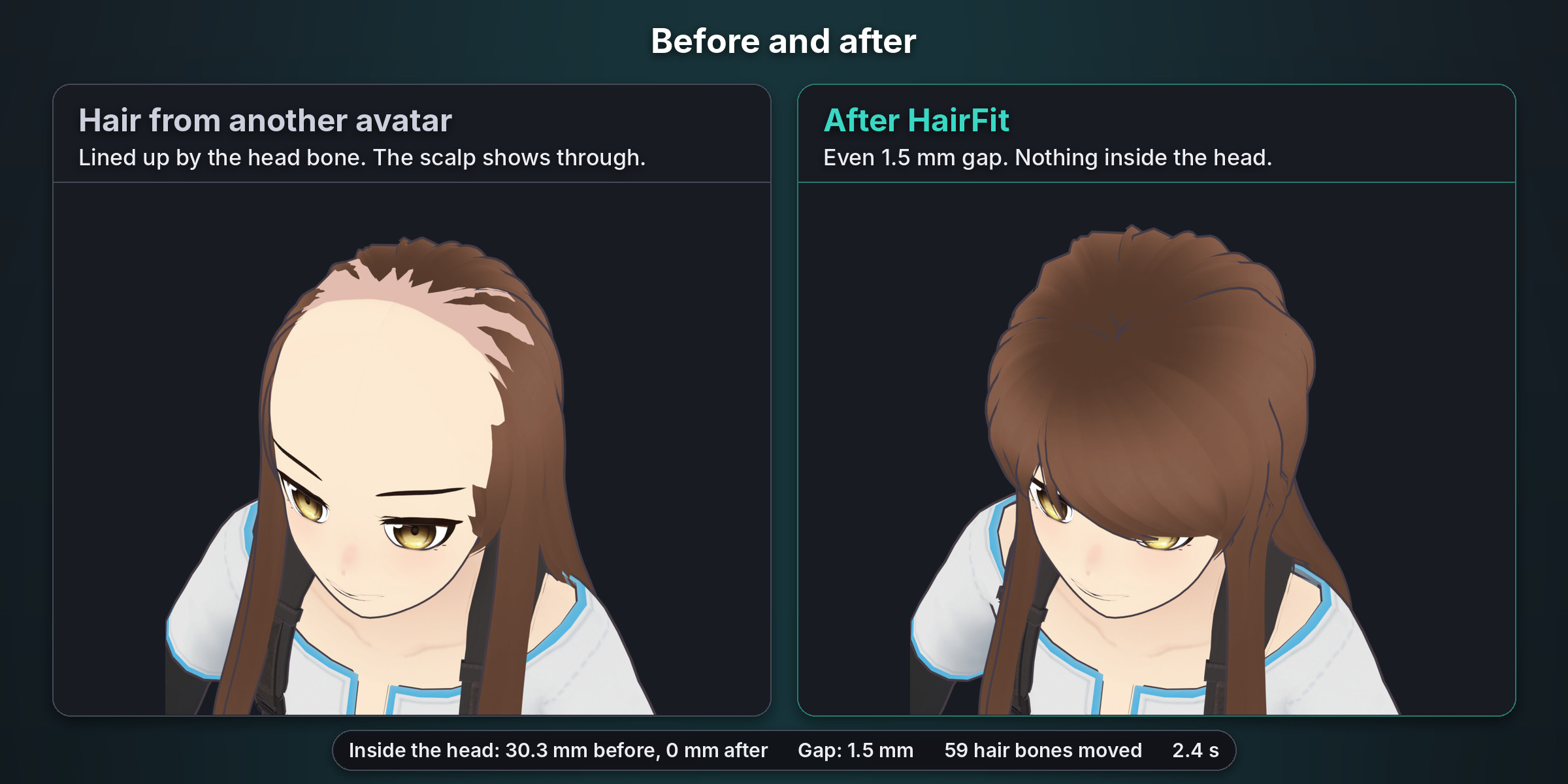
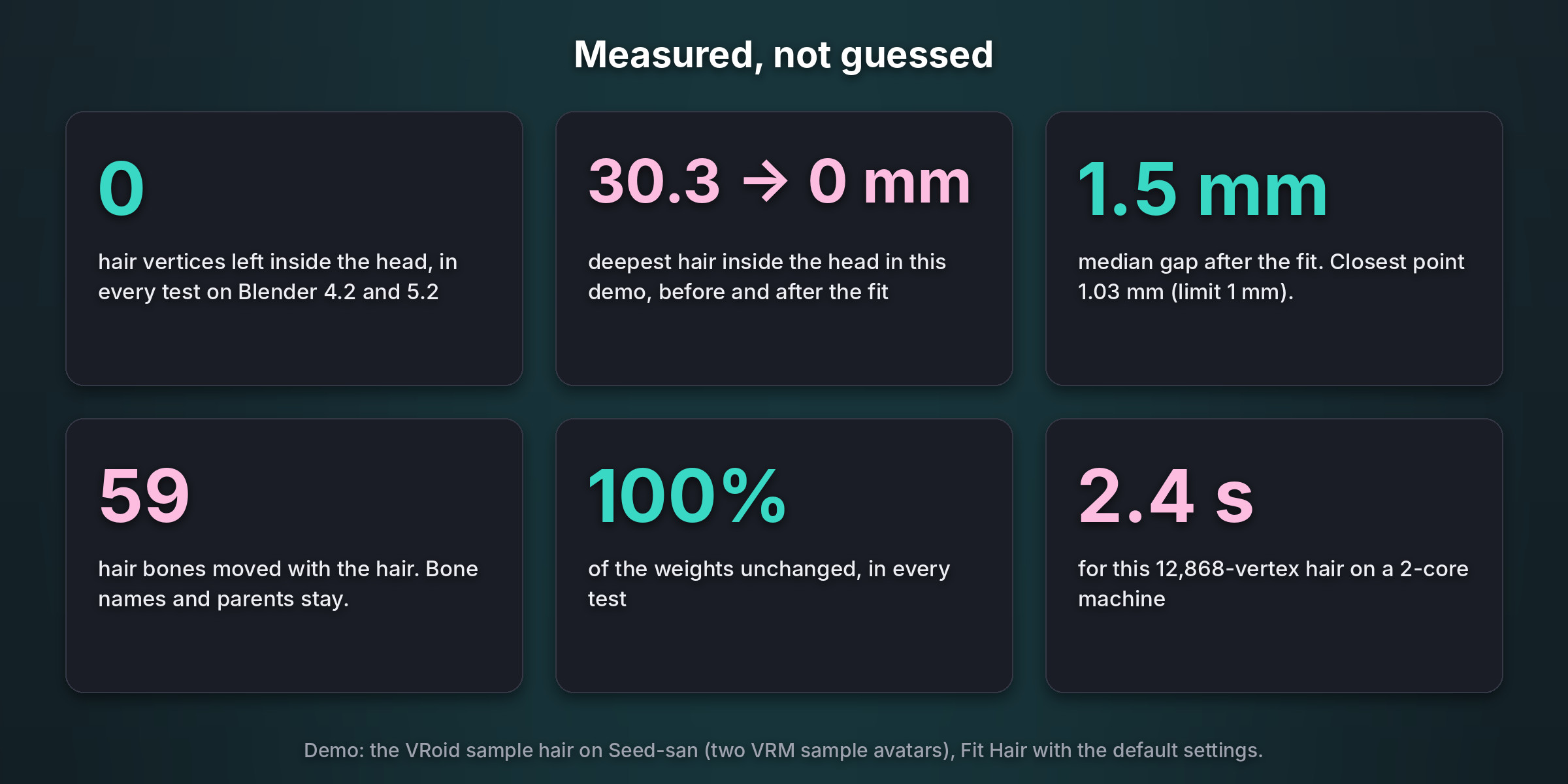
In our demo the VRoid sample hair went onto Seed-san's head. Lined up by the head bone, it sat up to 30.3 mm inside the head, and the scalp showed through. After Fit Hair: an even 1.5 mm gap, nothing inside the head, the closest point 1.03 mm away, 59 hair bones moved with the hair and every weight unchanged. It took 2.4 seconds.
What you get
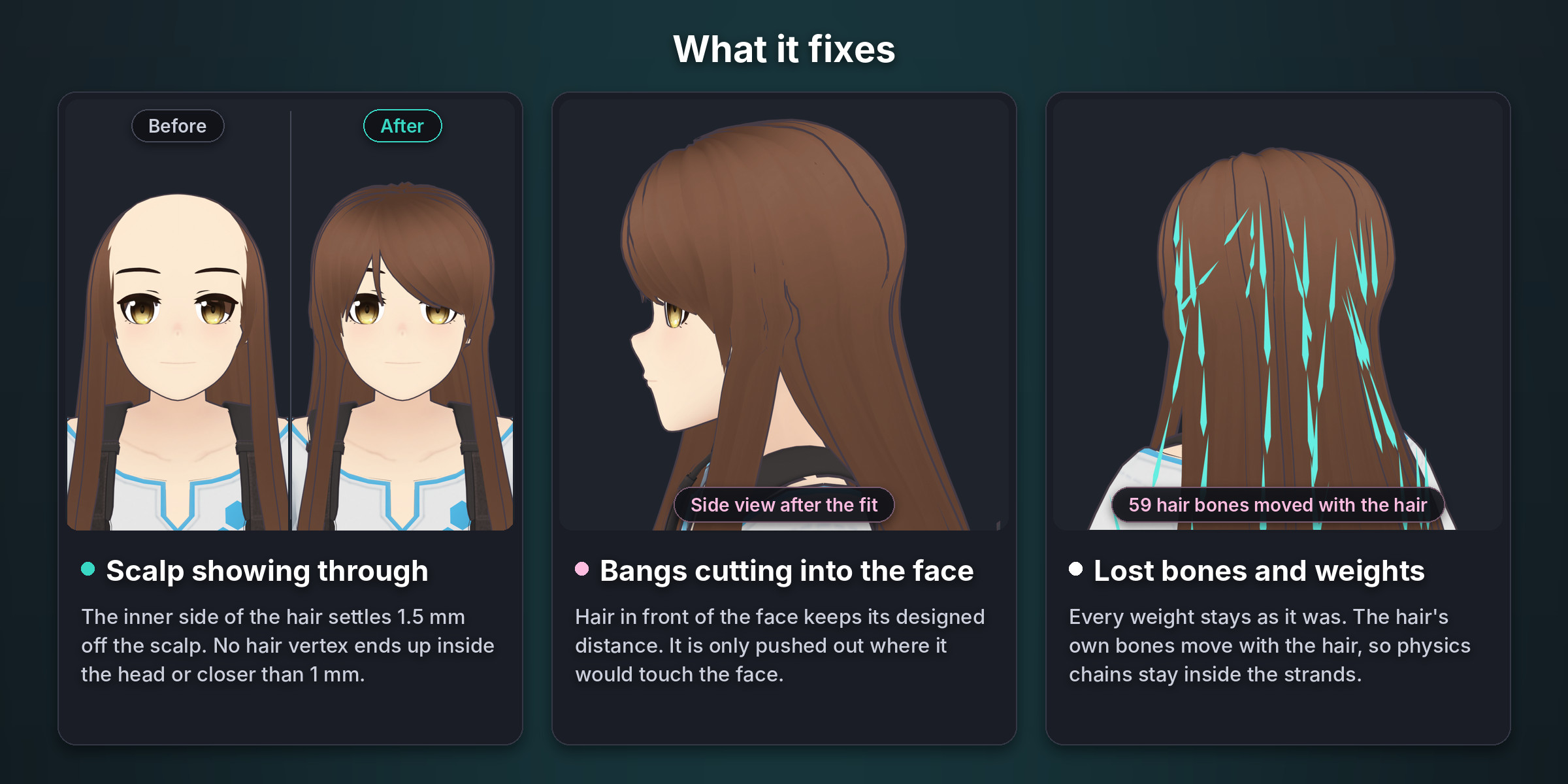
- Even gap. 1.5 mm by default (1 to 5 mm). Nothing ends up inside the head or closer than 1 mm.
- Size and position first. The whole hair is scaled, turned (up to 8 degrees) and moved onto the new skull. Then a smooth fit follows its shape.
- Bangs protected. Hair in front of the face keeps its designed distance. It moves out only where it would touch the face.
- Style kept. Outer layers move with the inner side, so the hair keeps its thickness. Long hair moves as one piece with the scalp.
- Bones and weights kept. Weights never change. The hair's own bones (physics chains) move with their strands. The avatar's bones never move.
- With or without the original avatar. Lined up by the head bone, or matched head to head when the original avatar is there.
- Hide Scalp Under Hair. An optional mask hides the head faces that the hair covers fully.
- Safe. One Ctrl+Z undoes a fit. Restore Original works even after saving and reopening. Shape keys keep their offsets. Clear messages when something is missing, and nothing changes when a fit stops.
- English and Japanese interface, the report included. Blender 4.2 to 5.2. Pure Python, nothing else to install.
Tested on
- Blender 4.2.23 LTS and 5.2.2 LTS: 50 automated tests on each, 49 pass. The open case is the hardest pairing: an anime hair morphed onto a realistic head with its original avatar. Its bangs change shape by 2.1 percent of their size, and our limit is 2 percent. Fitted without the original avatar, the same pair passes.
- A fresh install of the release zip on both versions, with Fit Hair at every default.
- Heads: the two VRM sample avatars (the VRoid sample and Seed-san), a CC0 MakeHuman head and 7 avatars made by script.
- Hairs: both sample hairs on each other's heads, and the VRoid sample hair on the MakeHuman head, each with and without the original avatar; a separate ponytail piece; script-made hairs with bones, weights and a shape key.
- Checked on every fit, apart from the add-on's own code: no hair vertex inside the head or within 1 mm, every weight identical, bone names, parents and deform flags identical, hair bones still with their vertices, the avatar's bones not moved, shape keys with their offsets.
- Our demo hair (12,868 vertices) took 2.4 seconds on a 2-core machine. A 30,000-vertex hair takes about 10 to 30 seconds.
Good to know
- Only the head is fitted. Long hair that passes through the shoulders, back or chest is not corrected.
- Each hair mesh is fitted on its own. Overlaps between separate hair meshes are not corrected. A ponytail on its own mesh: join it to the main hair first, or keep the original avatar in the scene.
- HairFit does not merge the hair's armature into the avatar's. Do that the usual way afterwards (Modular Avatar in Unity, or joining the armatures in Blender).
- Hide the avatar's own hair first. VRoid avatars keep a hair base layer inside the Body mesh (the HairBack faces): delete those faces too.
- Bangs that touch the new face bend a little where they touch. For a big change of style (an anime hair on a realistic head), fit without the original avatar.
- Apply a Mirror or Solidify modifier on the hair, and a Mirror modifier on the head, before you fit.
- Avatars at real size in meters (VRChat, VRM, Unity FBX).
- Tested on VRM sample avatars, CC0 MakeHuman heads and script-made hairs. Not yet tested on BOOTH hairs.
Avatar in the images and video: Seed-san (model by VirtualCast, Inc., VRM Public License 1.0), wearing the hair of pixiv's VRM1_Constraint_Twist_Sample ((c) 2022 pixiv Inc., VRM Public License 1.0). Details in credits.txt.
AI disclosure: AI coding assistants helped write this add-on's code, tests and texts. The avatar shots are Blender renders of the add-on's real output; no AI image, video, voice or music generator was used.
FAQ
Does it work with hair made for another avatar?
Yes. That is what it is for. The hair can come from any avatar, and you do not need that avatar.
Do I need the original avatar?
No. HairFit reads your avatar's head itself. If you do have the original avatar with the hair on it, HairFit uses it to keep the designed distance of every part of the hair.
Will my PhysBones still work?
Yes. Weights do not change, and the hair's own bones move with the hair, so the chains stay inside their strands.
Is it a shrinkwrap?
No. Shrinkwrap pulls every vertex onto the head. HairFit sets the inner side of the hair to an even gap, keeps the thickness of the outer layers and keeps the bangs off the face.
Does it work with VRoid and VRM avatars?
Yes. We tested it with the VRoid sample and Seed-san. BOOTH hairs are not in our tests yet.
What about long hair on the shoulders?
Only the head is fitted. Hair that passes through the shoulders or back is left as it is.
Can I go back?
Yes. One Ctrl+Z, or Restore Original at any time, also after saving and reopening the file.
Which Blender versions?
Blender 4.2 to 5.2. Tested on 4.2.23 LTS and 5.2.2 LTS. Pure Python, nothing else to install.
License: GPL-3.0-or-later.