
商品描述
本商品包含 AI 生成的内容。
A navy-and-yellow butterfly for your upper arm.
AI-Assisted: this item was made using AI as a tool (see "About AI use" below).
中文说明在下方 ↓
Yocho II — Night Butterfly Tattoo (B) — a Japanese-style tattoo for VRChat avatars (3D data).
One design, "Night Butterfly B (butterfly and crescent moon)". The included Unity tool generates a thin overlay mesh that follows your avatar's skin. A transparent PNG for lilToon decals is also included.
■ Checked inside VRChat (v1.0.0)
Checked inside VRChat on one in-house avatar (private upload): the menu, the blink, fit on the skin at the back / upper-arm / shoulder positions, flicker, mirrors and sync for other players. Other avatars and other body-part presets are unverified (details below).
■ At a glance
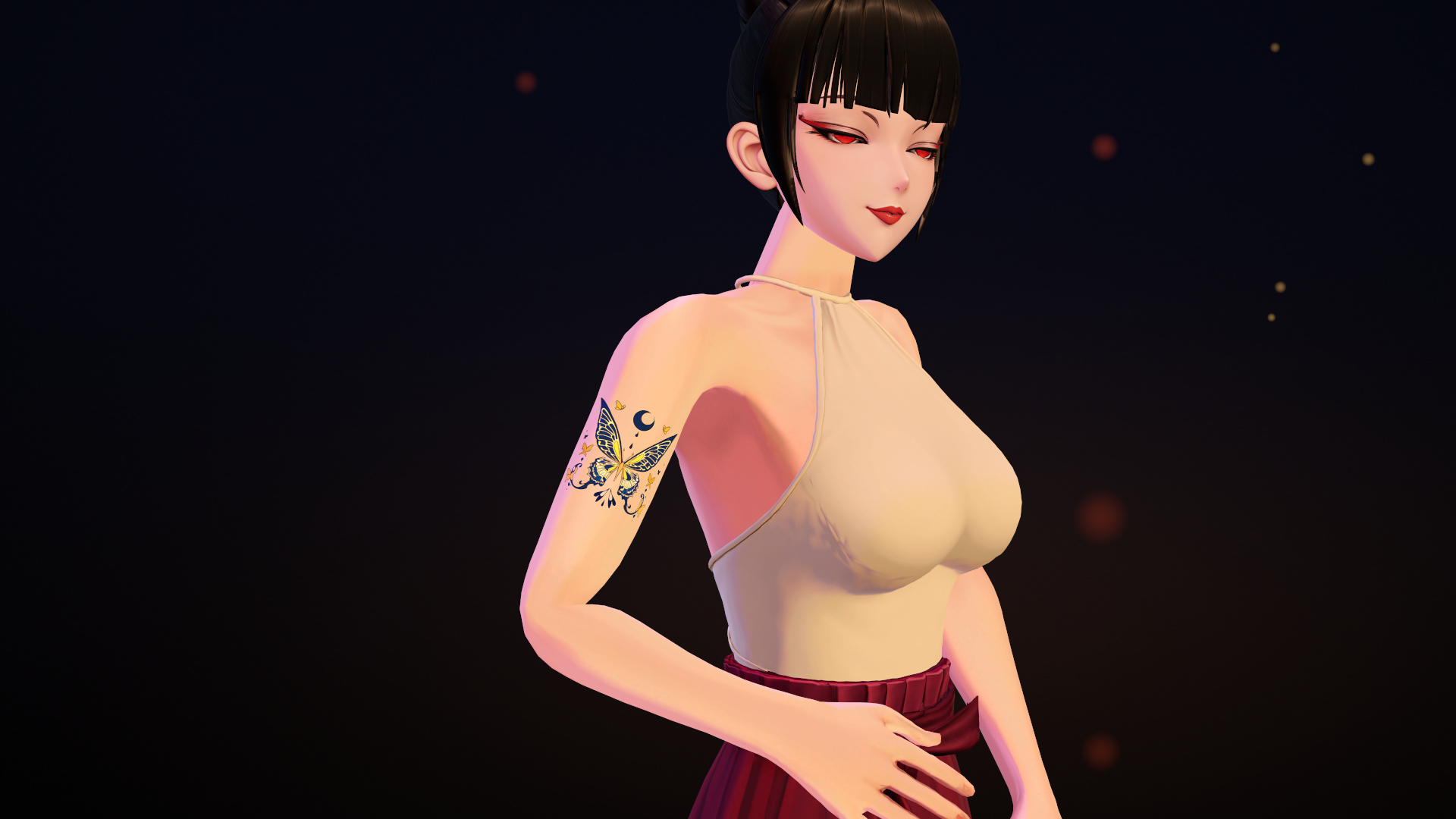
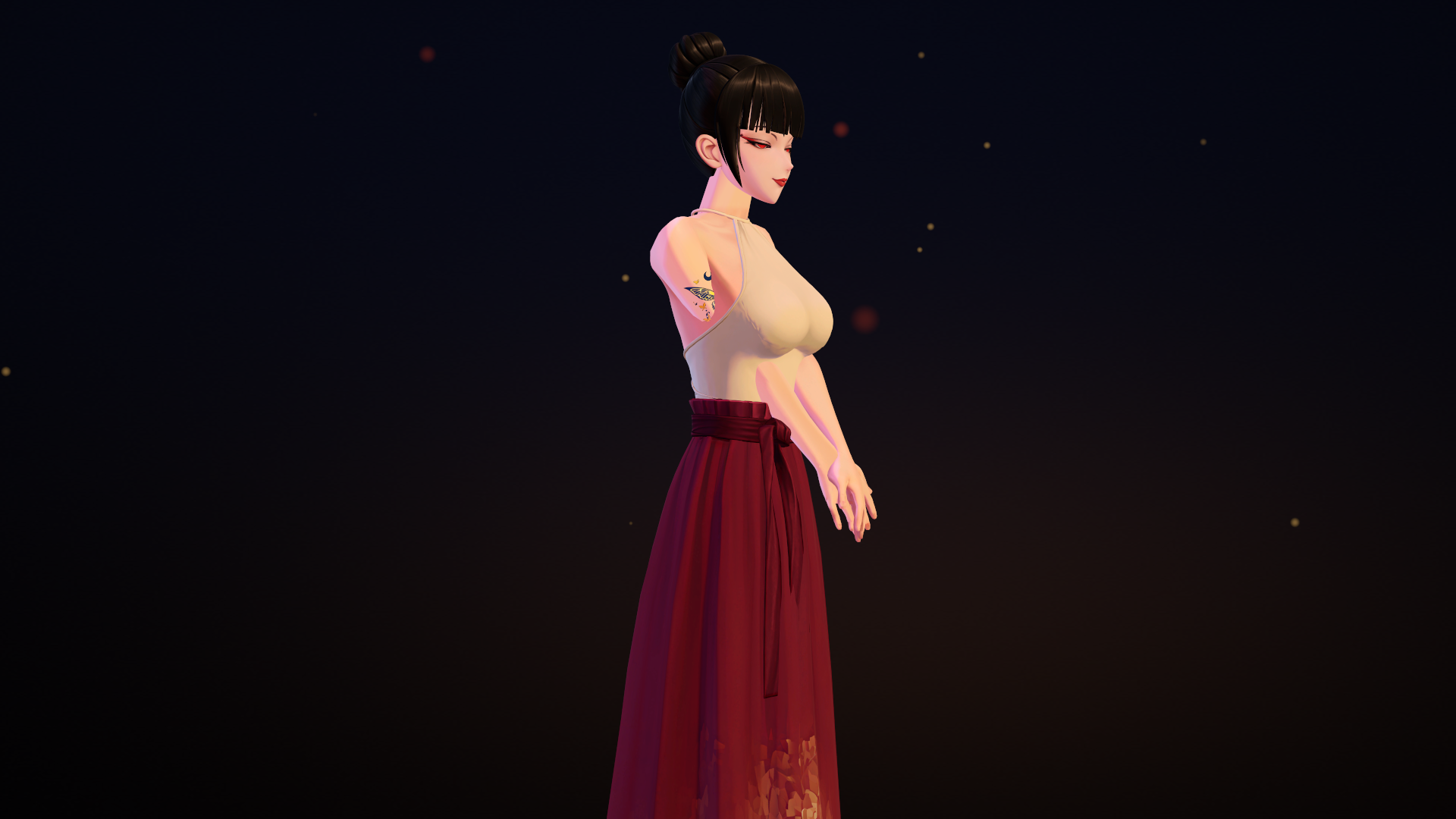
- One design. Shown on the right upper arm (outer side) in the images (0.08 m); it can be placed elsewhere too
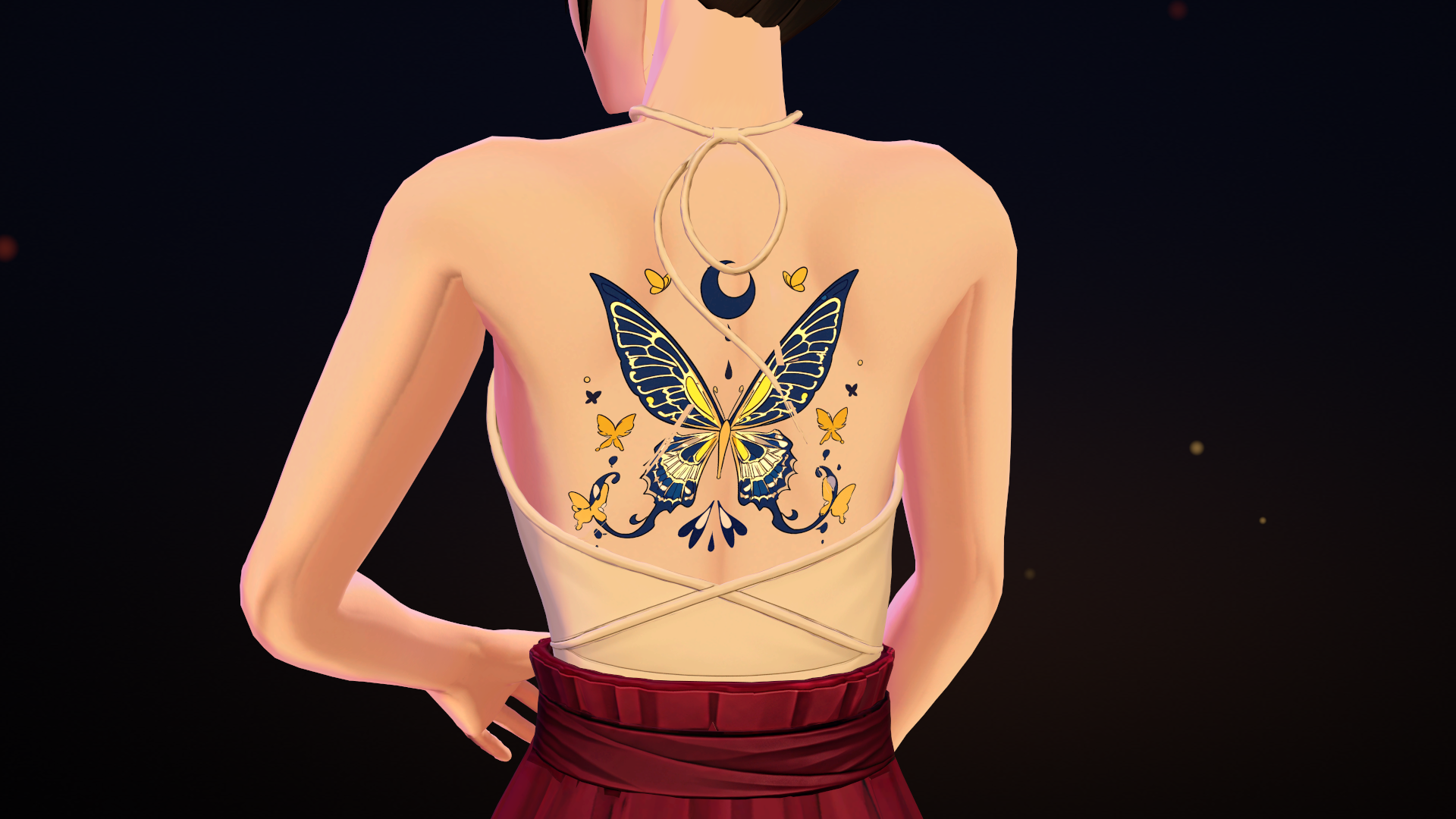
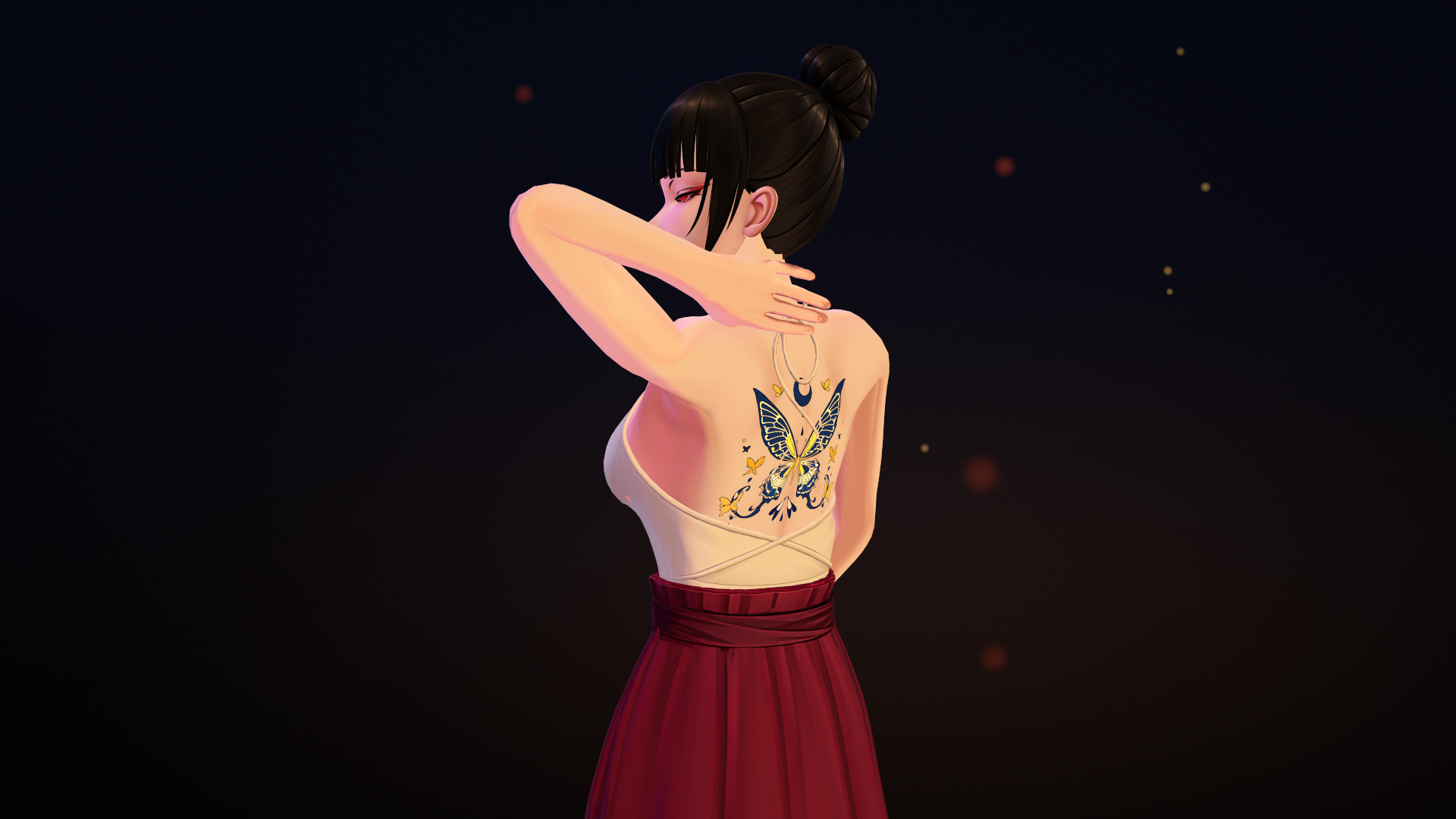
- Can also go on your back (see "On the back")
- The overlay mesh is generated on your own avatar (the body mesh is not modified)
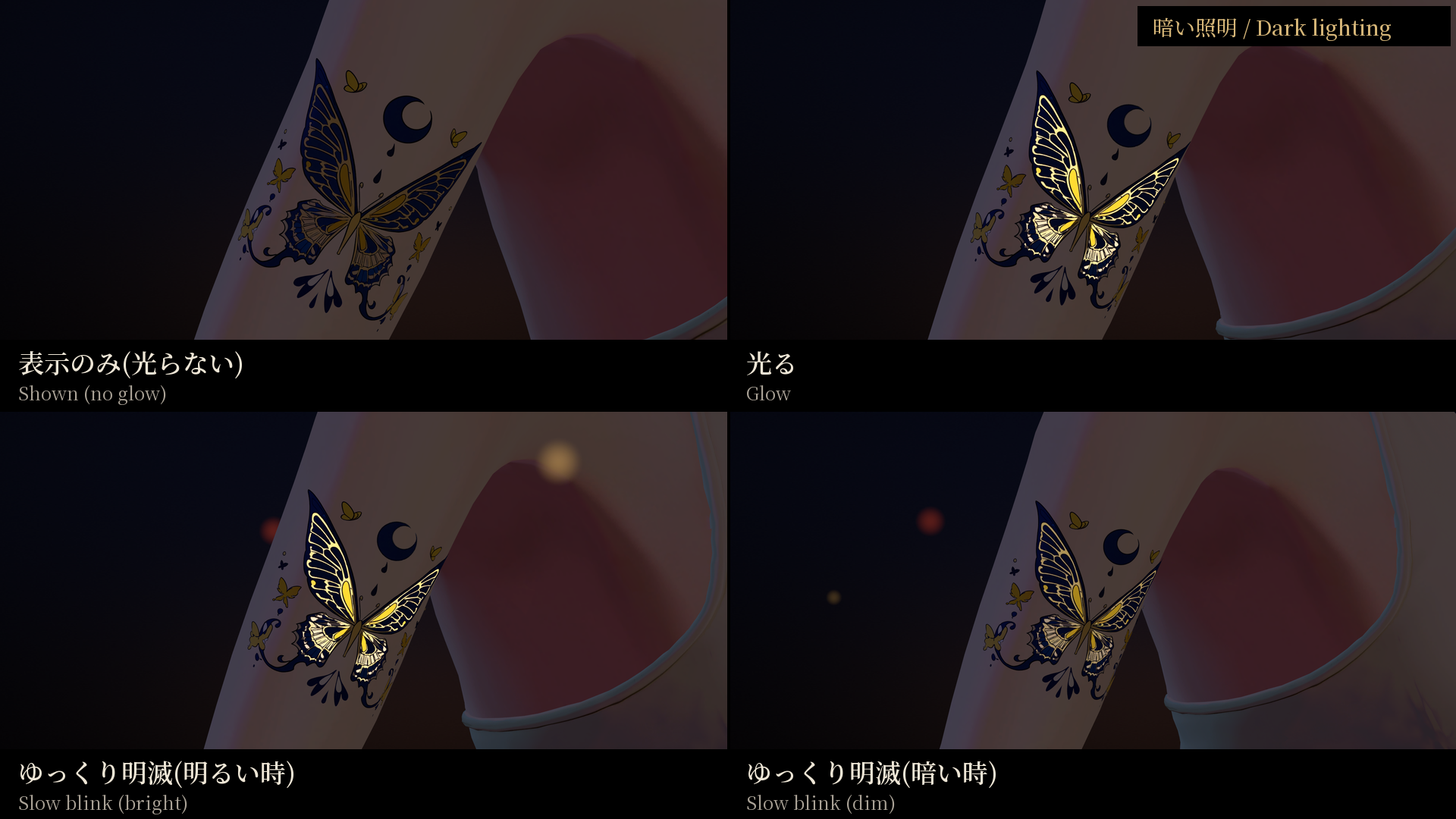
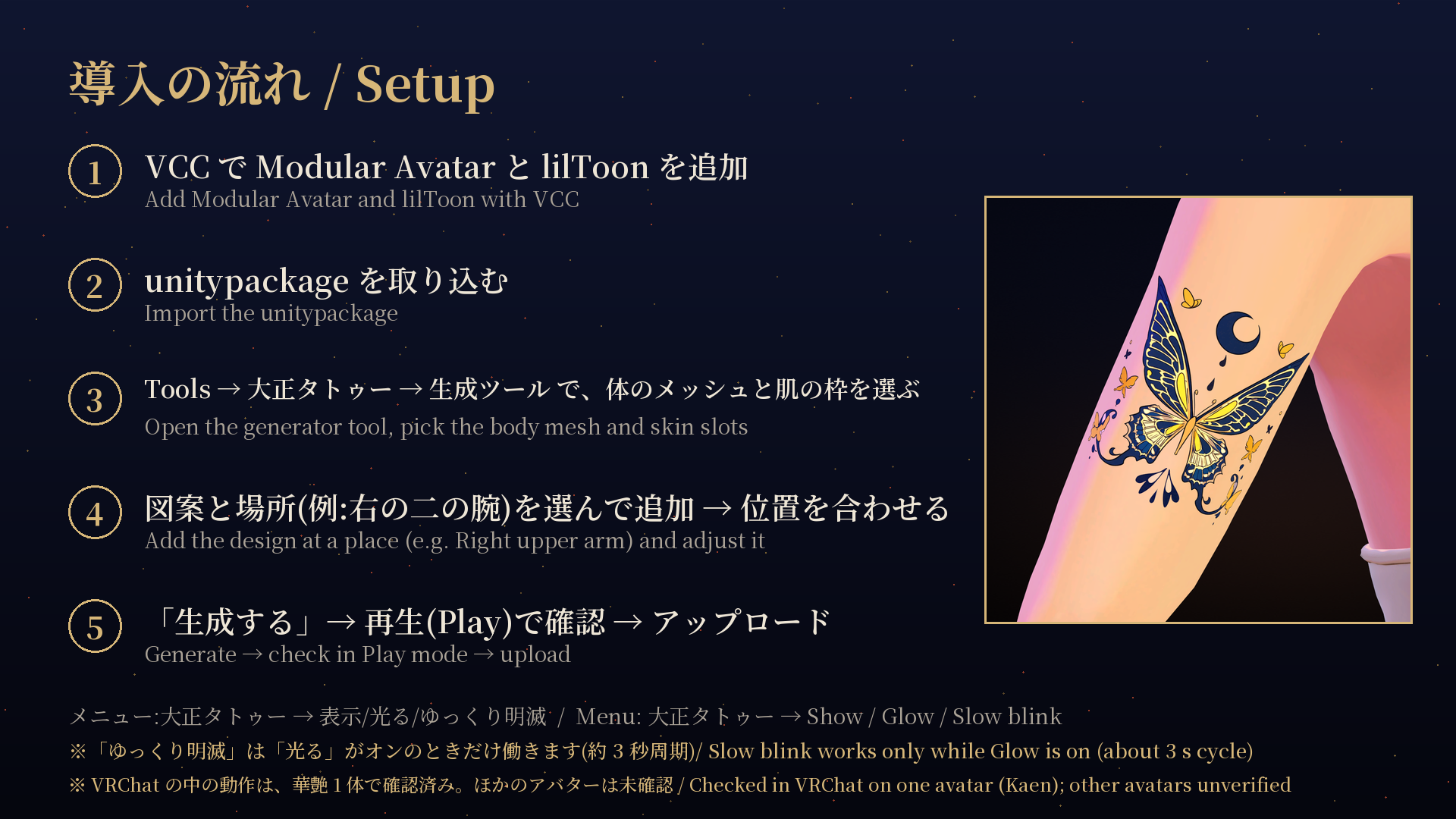
- Expression menu "大正タトゥー" → 表示 / 光る / ゆっくり明滅 (Show / Glow / Slow blink). Synced and saved, 3 bits, added automatically by Modular Avatar. The menu labels are in Japanese.
- Note: "ゆっくり明滅" (Slow blink) works only while "光る" (Glow) is on. Glow off = no glow / Glow on + Slow blink off = steady glow / Glow on + Slow blink on = blinks in a cycle of about 3 seconds.
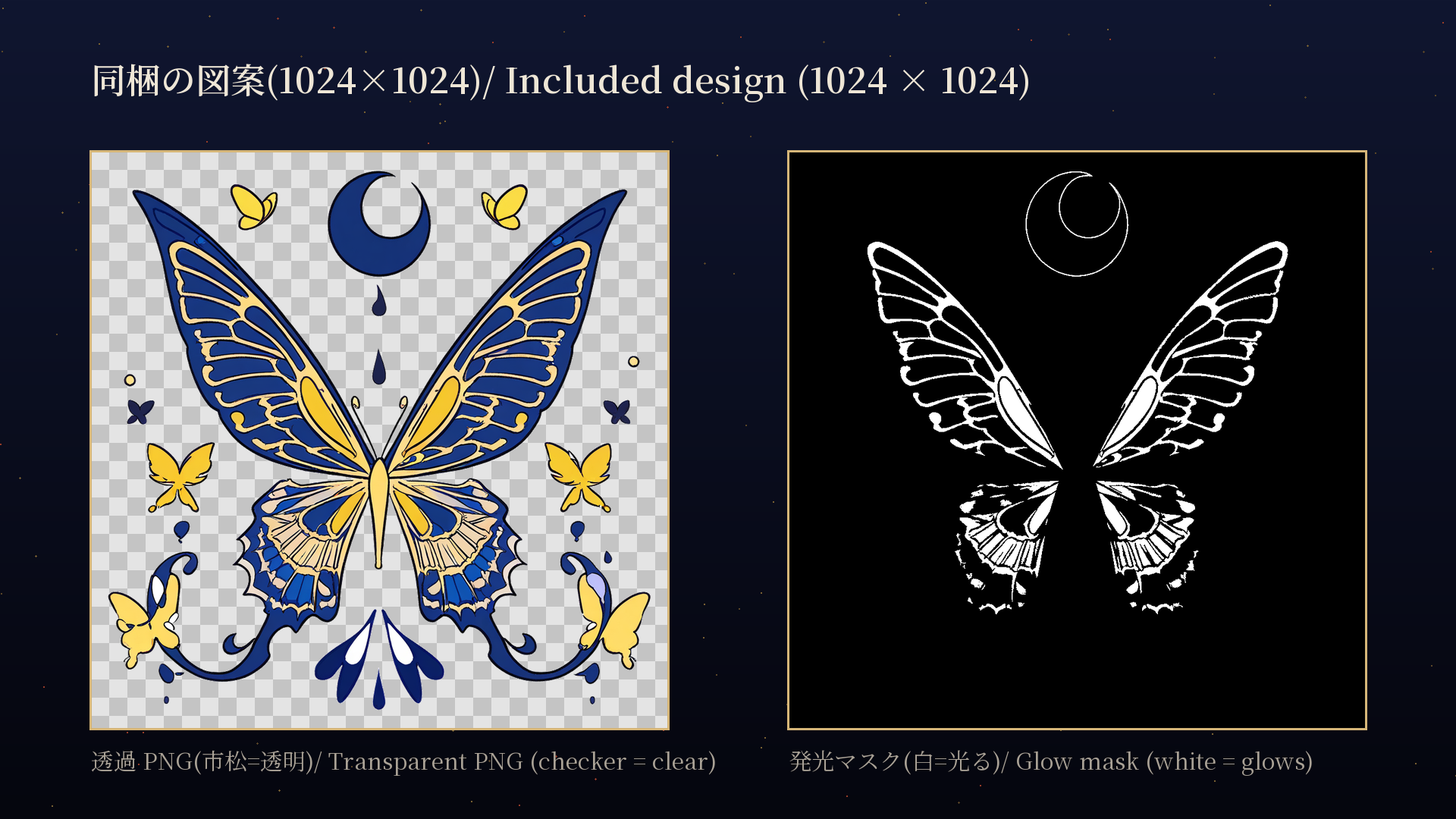
- Transparent decal PNG and glow mask (1024×1024) included
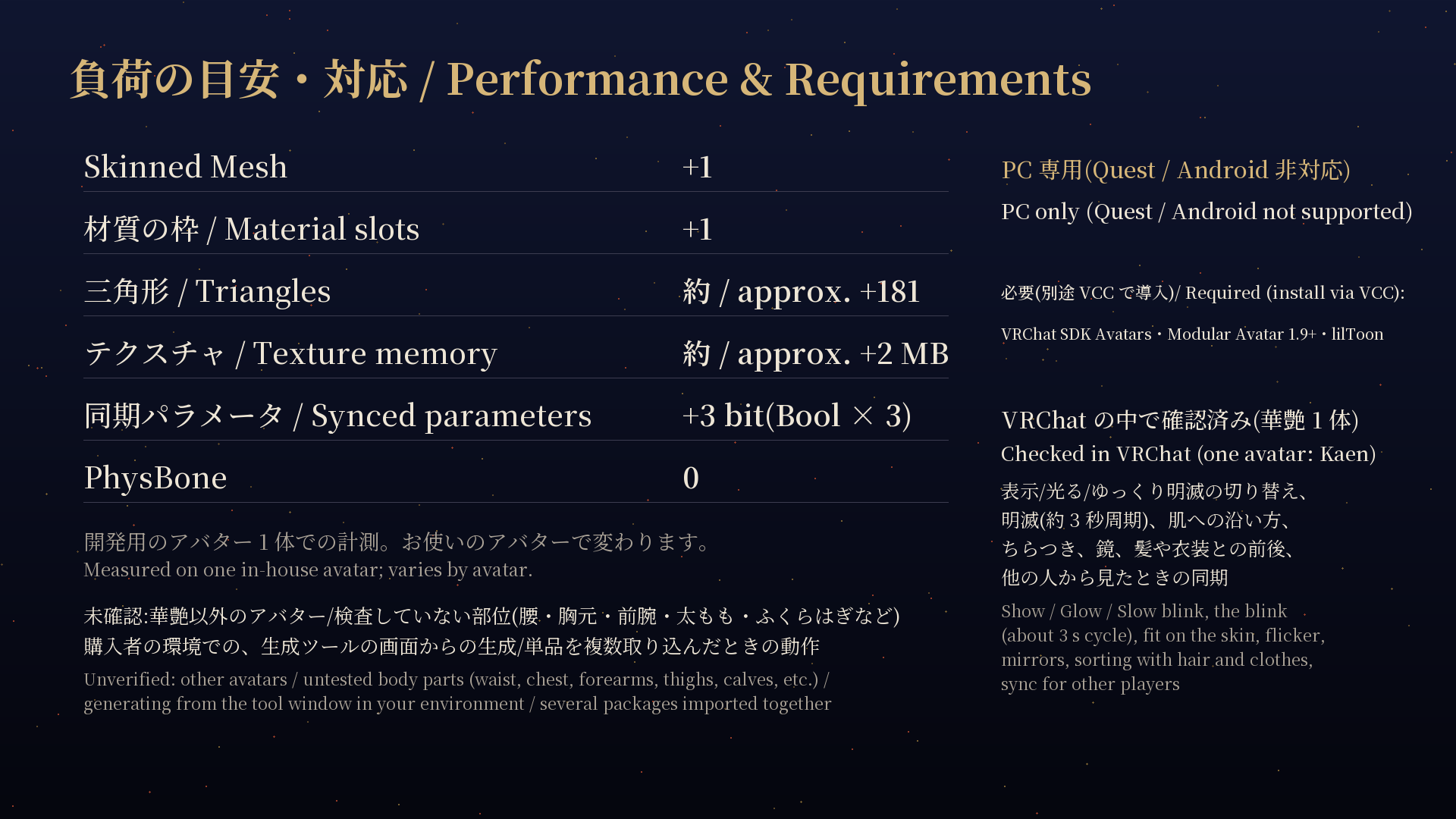
- PC only (Quest / Android not supported)
- AI-Assisted (made using AI as a tool)
■ Design
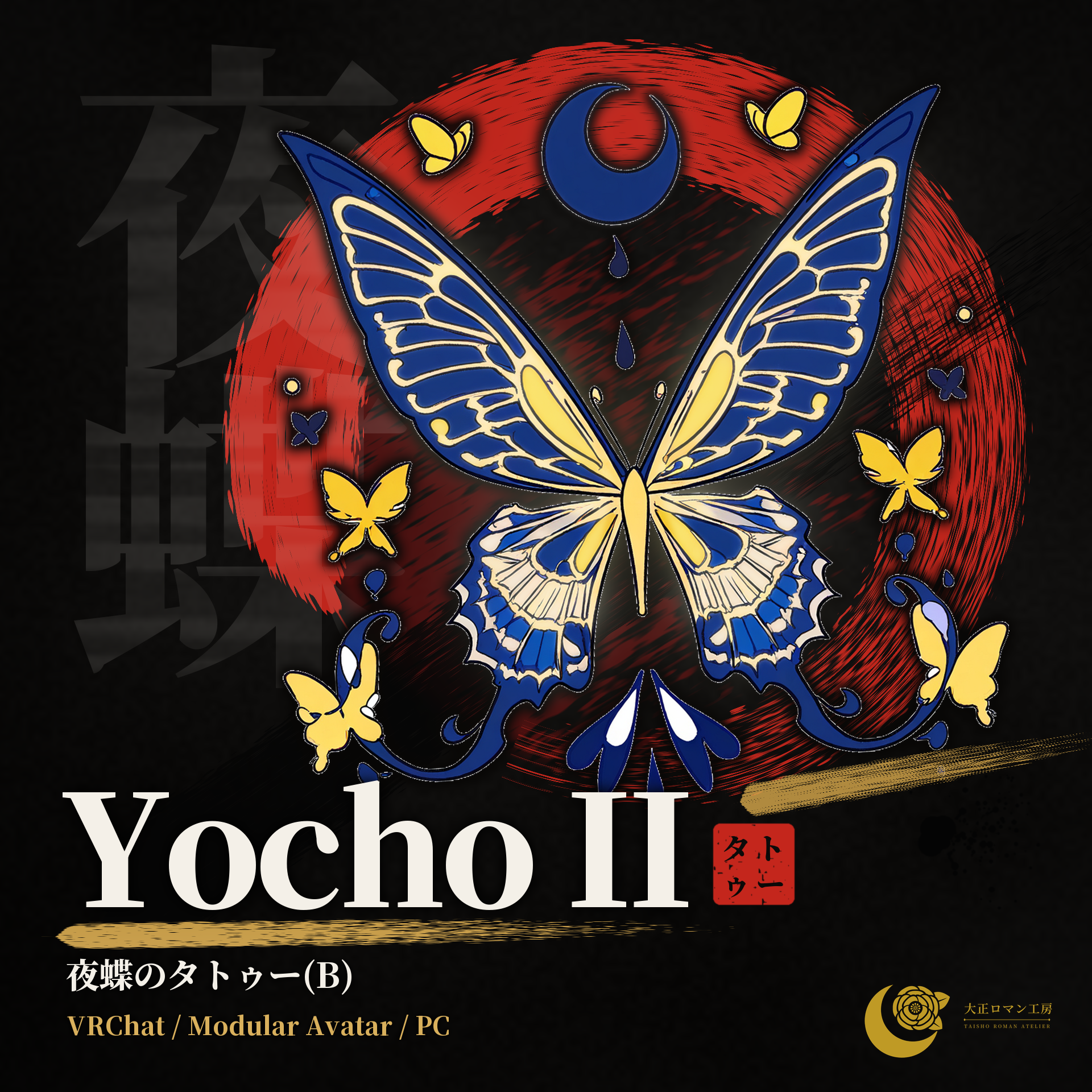
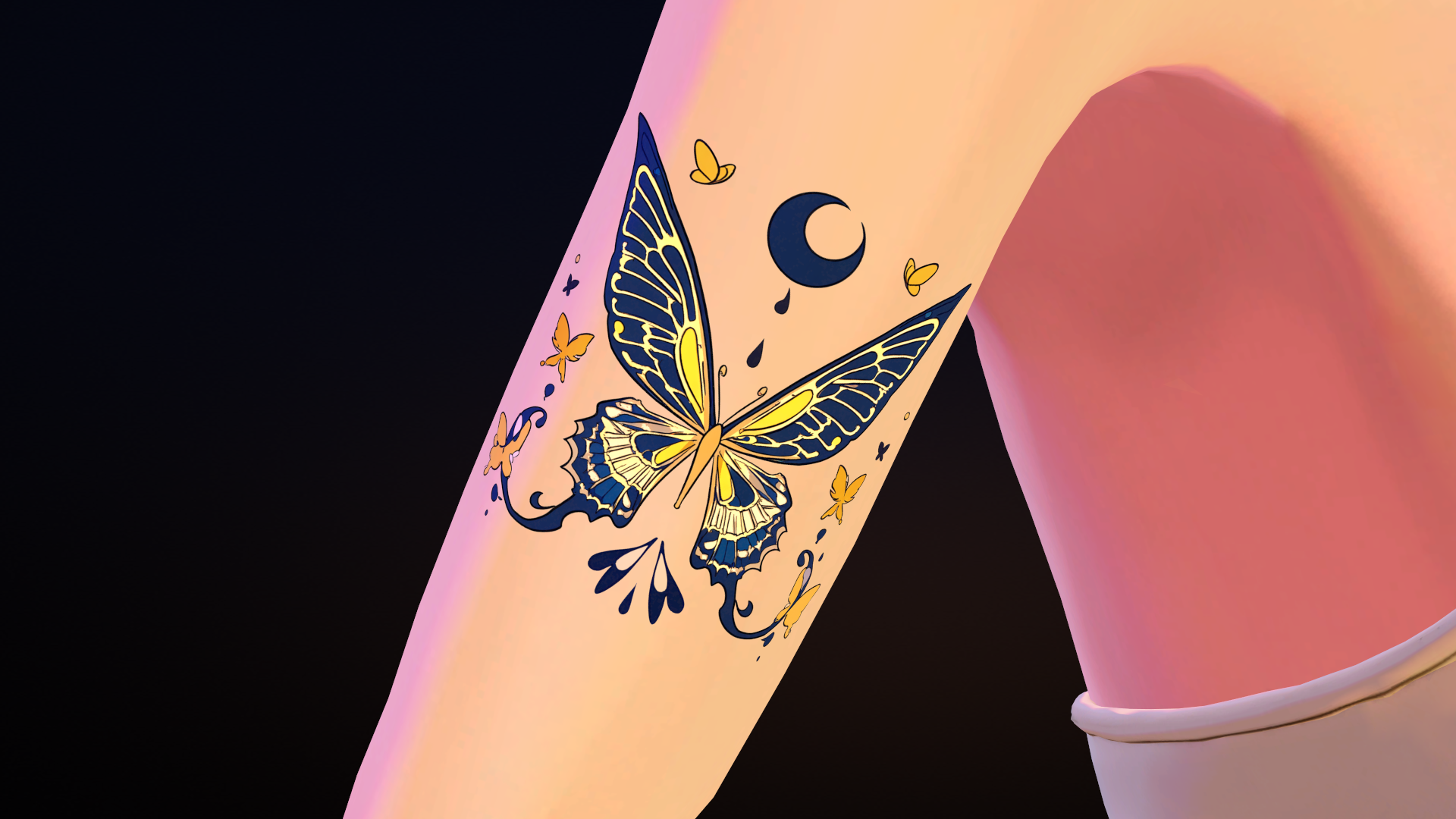
A symmetrical navy-and-yellow butterfly with a navy crescent moon and drops above, small yellow butterflies around and swirling scroll ornaments below. Glow: the wing veins and edges glow; the moon glows as an outline only; the small butterflies do not glow.
■ A vs B
Night Butterfly comes in two designs, A and B, sold as separate items. This item is B.
A: blue and gold, pale orange moon; ornate with many lines and large sweeping hind wings. B: navy and yellow, navy moon and drops; symmetrical, fewer lines, scroll swirls below.
■ On the back
Besides the right upper arm (outer side), this design can also be placed on the back. It was photographed on the back in the Unity Editor at 0.16 m (see the back images). In the VRChat check, Tsuru (another item) was the design placed on the back. On the back the triangle count goes up: approx. +412 on Kaen at 0.16 m (412–612 at 0.16–0.24 m).
■ What has been verified (v1.0.0)
Verified (one in-house avatar "Kaen"): in the Unity Editor, generation and the NDMF build check (no errors; the "大正タトゥー" menu and 3 synced parameters are added) and how this design looks in stills and video. Inside VRChat (private upload; 5 designs on the back, both upper arms and both shoulders, merged into one mesh and one material): switching Show / Glow / Slow blink and how the blink looks in dark and bright worlds; fit on the skin at those positions (no floating or steps); no flicker or slipping when walking or moving the arms; mirrors; sorting with hair and clothes; use together with the "ピアスの光" menu of the Moon / Plum pierce items; sync as seen by other players, and settings kept after rejoining.
Unverified: avatars other than Kaen / other body-part presets (waist, chest, forearm, thigh, calf, etc.) / generating from the tool window in your own environment / importing several single-design packages together / versions other than those listed below.
■ Placement
Body shapes differ between avatars. In the tool, pick a body-part preset (back, waist, chest, shoulder, upper arm, forearm, thigh, calf), adjust the position with the orange box (projector) in the Scene view, then press "生成する" (Generate). Generate again after moving it. Images: "right upper arm (outer side)", 0.08 m. See the included guide.
■ Requirements
Unity 2022.3 (2022.3.22f1) / VRChat SDK - Avatars 3.10.5 / Modular Avatar 1.9 or later (tested with 1.18.7) / lilToon (tested with 2.3.4) / PC VRChat only.
Not included: VRChat SDK, Modular Avatar, lilToon (install them with VCC).
Your avatar needs a VRC Avatar Descriptor, and the skin where you place the tattoo must be on a single Skinned Mesh.
■ What you get
TaishoTattoo_yochou_b_v1.0.0.zip
- unitypackage (design and generator tool)
- Decal PNG zip
- 導入手順_ReadMe.txt (setup guide) and 利用規約_Terms.txt (terms of use), Japanese / English
3D data only; nothing is shipped. No avatar or outfit is included.
■ Setup
1. Import the unitypackage into a VCC project that has Modular Avatar and lilToon
2. Select your avatar placed in the scene and open Tools → 大正タトゥー → 生成ツール (do not work inside Prefab Mode)
3. Select the body mesh and check only the skin material slots
4. Pick the design "夜蝶 B(蝶と三日月)" and a body part, press "追加" (Add), then adjust the position
5. Press "生成する" (Generate) → check in Play mode → upload as usual
■ Decal without the tool
Put the transparent PNG into lilToon's Main Color 2nd / 3rd on the skin material and use it as a decal. It may be cut at the body's UV seams, and it does not glow.
■ Performance (VRChat SDK performance stats, Unity Editor, PC)
One design: Skinned Mesh +1 / Material slots +1 / Triangles approx. +181 (on Kaen's right upper arm (outer side); varies with the avatar and size) / Texture approx. +2 MB / Parameters +3 bits / PhysBone 0
On the back: approx. +412 triangles (Kaen, 0.16 m; 412–612 at 0.16–0.24 m).
Generated together with other designs on one avatar (default): Skinned Mesh and material slots +1 in total (4 designs on Kaen: triangles +1,050, textures +8 MB).
■ Notes
- Not a physical tattoo or sticker.
- Images and the video were captured in the Unity Editor (inside VRChat, the look changes with world lighting). The bloom in the video is an editing effect.
- The light lines, halo and sparkles in the thumbnail (first image) are image effects.
- Because it uses a transparent material, the draw order with other transparent parts (such as semi-transparent hair) may break (checked with Kaen's hair and clothes in VRChat; other avatars and effects unverified).
- The generator window shows "v0.1.0" in its heading; this is the tool's internal number. This item is v1.0.0.
- The text in the images is in Japanese / English.
■ About AI use (AI-Assisted)
This item was made using AI as a tool; it is not hand-drawn piece by piece.
- Design concept: chosen by the creator from candidates made with an image-generation AI (run locally).
- Background removal and the glow mask: made with automated processing and AI (Claude, Codex).
- The Unity generator tool and the promotional images / video: made by an AI assistant (Claude).
- The creator reviewed the results of each step.
- The avatar shown in the images (not included) was also made with AI assistance.
■ Terms of Use (summary)
Allowed: use in VRChat etc., adjustment / modification for your own use, Public avatar upload (as long as the data cannot be extracted), personal commercial use, monetized videos / streams, adult (R-18) content (within each service's rules and the law).
Contact us first: commercial use by companies.
Not allowed: redistribution / transfer / resale (including the design PNG or the generator tool on its own), distributing or selling modified designs or data, distributing the generated mesh / material / textures themselves, bundling into avatars or products for sale, use as AI training data, passing it off as a real tattoo (e.g. fraud), offensive use.
Refunds: due to the nature of digital products, returns and refunds are not accepted after purchase. For problems such as damaged data, please contact us.
Full terms: "利用規約_Terms.txt" in the zip (Japanese / English; the Japanese version prevails).
■ Changelog
v1.0.0: First release
■ Contact
Please contact us through Jinxxy.
Taisho Roman Atelier (大正ロマン工房)
――――――――――――――――――――
藏青与明黄的蝴蝶,点缀上臂。
AI 辅助制作(AI-Assisted):本商品以 AI 为工具制作(详见下方「关于 AI 的使用」)。
※ 本中文说明由 AI 辅助翻译,仅供参考。如与英文说明有出入,以英文说明为准。附带的安装说明和使用条款为日文 / 英文(无中文版)。
Yocho II —— 夜蝶纹身(B) —— 适用于 VRChat Avatar 的和风纹身(3D 数据)。
图案 1 款:「夜蝶 B(蝶と三日月)」。附带的 Unity 工具会生成贴合您 Avatar 皮肤的薄层叠加网格。另附 lilToon 贴花(Decal)用的透明 PNG。
■ 已在 VRChat 中确认(v1.0.0)
已在 VRChat 中用 1 个自制 Avatar 确认(非公开上传):菜单、明灭、在背部/上臂/肩部位置与皮肤的贴合、闪烁、镜子中的显示,以及其他玩家看到的同步。其他 Avatar 和其他部位的预设尚未确认(详见下文)。
■ 要点
- 图案 1 款。图片中贴在右上臂(外侧)(0.08 m);也可以贴在其他部位
- 也可以贴在背部(见「贴在背部」)
- 叠加网格在您自己的 Avatar 上生成(不会改写身体网格)
- Expression 菜单「大正タトゥー」→ 表示 / 光る / ゆっくり明滅(显示 / 发光 / 缓慢明灭)。同步并保存,3 位,由 Modular Avatar 自动添加。菜单文字为日文。
- 注意:「ゆっくり明滅」(缓慢明灭)只在「光る」(发光)开启时起作用。发光关闭 = 不发光 / 发光开启 + 明灭关闭 = 持续发光 / 发光开启 + 明灭开启 = 约 3 秒一个周期明灭。
- 附带贴花用透明 PNG 和发光遮罩(1024×1024)
- 仅限 PC(不支持 Quest / Android)
- AI 辅助制作(以 AI 为工具制作)
■ 图案
藏青与黄色的左右对称蝴蝶。上方有藏青色的弯月和水滴,周围点缀黄色小蝴蝶,下方有卷草风的涡旋装饰。发光部分:翅脉和翅膀边缘发光;弯月只有轮廓发光,小蝴蝶不发光。
■ A 与 B 的区别
夜蝶有 A、B 两款图案,为不同的商品。本商品为 B。
A:蓝与金、淡橙色弯月;华丽、线条多,下翅大弧线展开。B:藏青与黄、藏青色弯月和水滴;左右对称、线条少、简洁,下方有卷草风涡旋。
■ 贴在背部
除了右上臂(外侧),本图案也可以贴在背部。已在 Unity 编辑器中以 0.16 m 的大小贴在背部拍摄(见背部图片)。在 VRChat 中确认时,贴在背部的是另一款商品 Tsuru。贴在背部时三角面会增加:華艶、0.16 m 时约 +412(0.16〜0.24 m 时为 412〜612)。
■ 已确认的范围(v1.0.0)
已确认(1 个自制 Avatar「華艶」):在 Unity 编辑器中的生成和 NDMF 构建检查(无错误;会添加「大正タトゥー」菜单和 3 个同步参数),以及本图案在静态图片和视频中的外观。在 VRChat 中(非公开上传;将 5 款图案贴在背部、左右上臂和左右肩部,合并为 1 个网格、1 个材质):显示/发光/缓慢明灭的切换,以及在暗处和明亮世界中的明灭效果;这些位置与皮肤的贴合(无浮起、无断层);走动或移动手臂时无闪烁、无错位;镜子中的显示;与头发和服装的前后关系;与笔尖耳钉(Moon / Plum)的「ピアスの光」菜单同时使用;其他玩家看到的同步,以及重新进入世界后设置的保留。
未确认:華艶以外的 Avatar / 其他部位的预设(腰部、胸前、前臂、大腿、小腿等)/ 在您自己的环境中通过工具窗口生成 / 同时导入多个单品图案包 / 下列以外的版本。
■ 位置/部位的调整
不同 Avatar 的体型不同。请在工具中选择部位预设(背部、腰部、胸前、肩部、上臂、前臂、大腿、小腿),用 Scene 视图中的橙色方框(投影器)调整位置后,按「生成する」(生成)。移动位置后请重新生成。图片:「右上臂(外侧)」,0.08 m。步骤见附带的安装说明。
■ 运行环境
Unity 2022.3(2022.3.22f1)/ VRChat SDK - Avatars 3.10.5 / Modular Avatar 1.9 以上(测试版本 1.18.7)/ lilToon(测试版本 2.3.4)/ 仅限 PC 版 VRChat。
不包含:VRChat SDK、Modular Avatar、lilToon(请通过 VCC 安装)。
Avatar 需要有 VRC Avatar Descriptor,且贴纹身部位的皮肤需在同一个 Skinned Mesh 上。
■ 内容
TaishoTattoo_yochou_b_v1.0.0.zip
- unitypackage(图案和生成工具)
- 贴花用 PNG 的 zip
- 導入手順_ReadMe.txt(安装说明)和 利用規約_Terms.txt(使用条款),日文 / 英文
仅为 3D 数据,不发实物。不包含 Avatar 和服装。
■ 安装步骤
1. 将 unitypackage 导入已通过 VCC 安装 Modular Avatar 和 lilToon 的项目
2. 选中放在场景中的 Avatar,打开 Tools → 大正タトゥー → 生成ツール(请勿在 Prefab Mode 中操作)
3. 选择身体网格,只勾选皮肤材质的槽
4. 选择图案「夜蝶 B(蝶と三日月)」和部位,按「追加」(添加),然后调整位置
5. 按「生成する」(生成)→ 在 Play 模式中确认 → 照常上传
■ 不使用工具的贴花方式
把透明 PNG 放入皮肤材质(lilToon)的 Main Color 2nd / 3rd,作为贴花使用。可能会在身体 UV 的接缝处断开,且不会发光。
■ 性能开销(VRChat SDK 性能统计,Unity 编辑器,PC)
1 款:Skinned Mesh +1 / 材质槽 +1 / 三角面 约 +181(華艶的右上臂(外侧);随 Avatar 和大小变化)/ 纹理 约 +2 MB / 参数 +3 位 / PhysBone 0
贴在背部时:三角面 约 +412(華艶、0.16 m;0.16〜0.24 m 时为 412〜612)。
与其他图案在同一 Avatar 上一起生成(默认):Skinned Mesh 和材质槽合计 +1(華艶上 4 款图案:三角面 +1,050,纹理 +8 MB)。
■ 注意事项
- 并非真实的纹身或贴纸。
- 图片和视频在 Unity 编辑器中拍摄(在 VRChat 中,外观会随世界光照变化)。视频中的光晕是后期效果。
- 缩略图(第 1 张)中的光线、光环和闪光是图片效果。
- 由于使用透明材质,与其他透明物体(如头发的半透明部分)的前后顺序可能出错(已在 VRChat 中用華艶的头发和服装确认;其他 Avatar 和特效未确认)。
- 生成工具窗口标题中显示的「v0.1.0」是工具的内部编号。本商品为 v1.0.0。
- 图片中的文字为日文 / 英文。
■ 关于 AI 的使用(AI 辅助制作 / AI-Assisted)
本商品以 AI 为工具制作,并非逐件手绘。
- 图案原案:制作者从图像生成 AI(本地运行)生成的候选中挑选。
- 背景透明化和发光遮罩:通过自动处理和 AI(Claude、Codex)制作。
- Unity 生成工具以及宣传图片 / 视频:由 AI 助手(Claude)制作。
- 制作者检查了每个环节的结果。
- 图片中出现的 Avatar(不包含在商品中)也是在 AI 辅助下制作的。
■ 使用条款(摘要)
允许:在 VRChat 等平台使用、在自用范围内调整/修改、以 Public 形式上传 Avatar(不得以可提取数据的形式分发)、个人商业使用、带收益的视频 / 直播、R-18 内容(在各服务的规则和法律范围内)。
需事先联系:法人(公司/团体)的商业使用。
禁止:二次分发/转让/转售(包括单独分发图案 PNG 或生成工具)、分发或出售修改后的图案/数据、分发生成的网格/材质/纹理本身、捆绑进出售的 Avatar 或商品、用作 AI 训练数据、以让人误认为真实纹身为目的的使用(包括诈骗等)、违反公序良俗的用途。
退款:由于数字商品的性质,购买后不接受退货/退款。如遇数据损坏等问题,请与我们联系。
完整条款:zip 内的「利用規約_Terms.txt」(日文 / 英文,以日文版为准)。
■ 更新记录
v1.0.0:首次发布
■ 联系方式
请通过 Jinxxy 与我们联系。
大正ロマン工房(Taisho Roman Atelier)