
商品描述
本商品包含 AI 生成的内容。
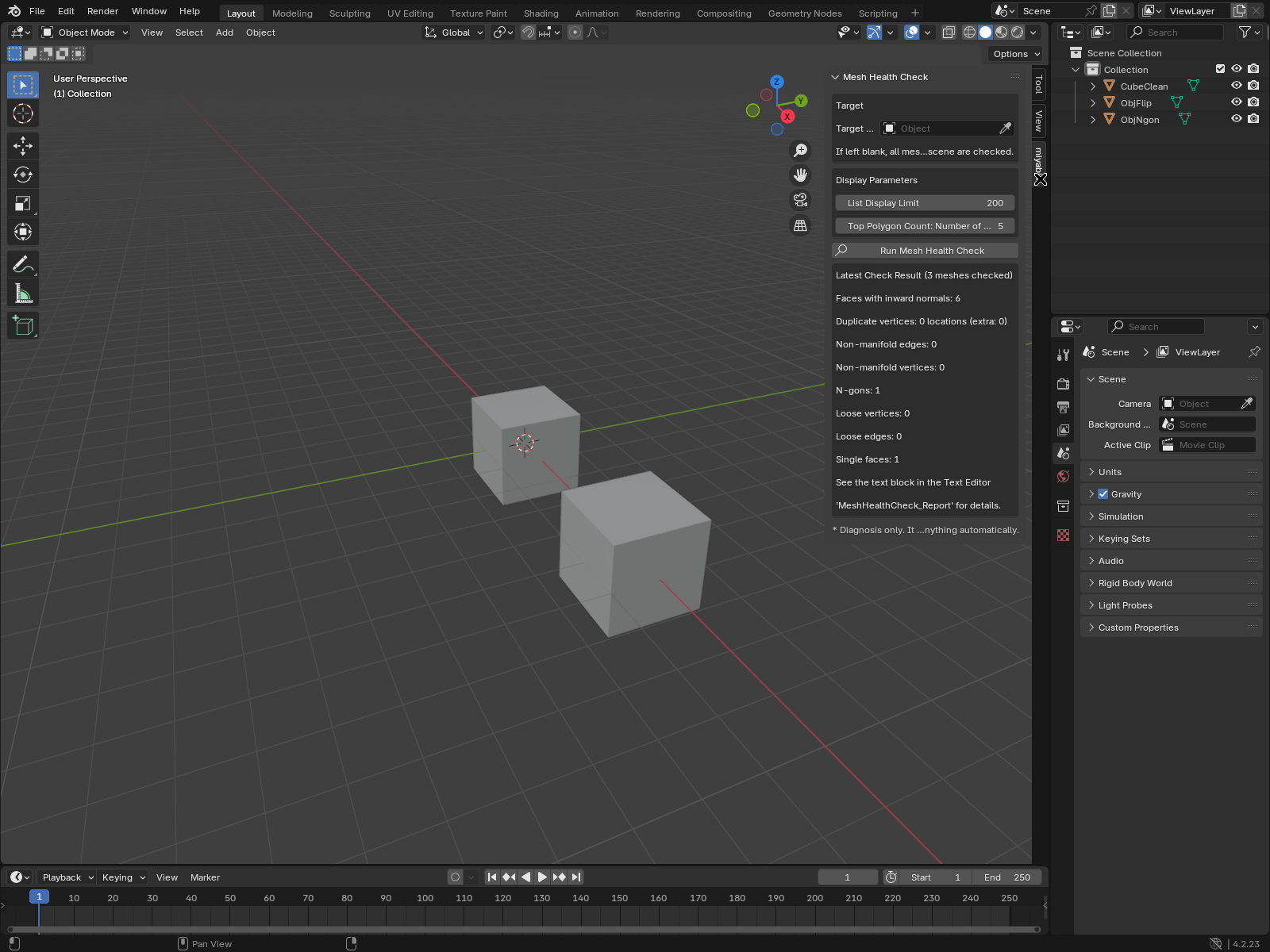
Parts of your mesh vanish in Unity. Shadows look wrong. The shape breaks on export — and you can't see why. The cause is often inside the mesh itself — not in your export settings. Mesh Health Checker runs a full health report across every mesh in your scene, and shows you exactly where the mesh is broken. Scan. Read the report. Fix the mesh before you upload. Blender 4.2 or 5.3. $9.99. What it checks Inward-facing normals — faces whose orientation points inward from the centroid (count and face indices; a centroid-based heuristic). Duplicate vertices — locations with identical coordinates (rounded to 5 decimal places), the number of locations, the total extra vertices, and sample positions (first 5). Non-manifold edges / vertices — edges shared by 3 or more faces, and vertices that belong to a face but whose connections are split. Boundary edges belonging to only 1 face are normal on an open mesh and are not counted. N-gons — faces with 5 or more vertices (count and face indices). Floating vertices, edges and faces — vertices not in any edge, edges not in any face, and faces that share no edge with any other face (counts and lists). Top polygon list — meshes with the most faces first (default 5), to find what makes the mesh heavy. A high count alone is not treated as a problem. Results are written to the "MeshHealthCheck_Report" text block. How to use Set the Target Mesh. If left empty, all meshes in the scene are checked. Adjust the parameters if needed: List Display Limit, Top Polygon Count (default 5). Press "Run Mesh Health Check". Read the report in the "MeshHealthCheck_Report" text block (open it in the Text Editor). Notes and limitations This addon only diagnoses and reports. It does not fix anything automatically — no normal recalculation, no merging duplicate vertices, no triangulating N-gons. The inward-normal check is a heuristic: on strongly concave shapes or open faces, a correct face can be counted as inward-facing. Vertices split on purpose (for split normals etc.) are counted as duplicates when their coordinates match. The non-manifold edge range is narrower than Blender's standard Select Non Manifold. The results are based on the scene at the time you run it. Run it again after making changes. If a problem occurs, try running it with other addons disabled to isolate conflicts. Works fully offline. No external libraries are used (only Blender's standard bpy). Installation Start Blender 4.2 or 5.3, open Edit > Preferences > Add-ons. Install the .py file via Preferences > Add-ons > Install... and select the .py file, then enable the addon by checking its checkbox. A "miyabix" tab is added to the 3D Viewport sidebar (N key). System requirements Blender 4.2 or 5.3 (Windows / macOS / Linux — any environment where Blender runs) Files included mesh_health_checker.py — the addon README.txt — full English instructions Refund policy For defects such as the addon failing to start, please contact the shop within 5 days of purchase with a detailed description of your operating conditions (Blender version, object structure, error messages, etc.). We will review the details and respond. Refunds cannot be accepted for requests outside the scope of use, or for behavior that matches the specifications.